Your Device , Your Command.....
Hey guys... after a long time!!!!
I was a little busy... had my exams and stuff...
Putting the excuses aside! I was waiting to post something really useful for you all! "you all" who have helped me cross a 700 views... I've decided to express my love for you all by blogging on something that can help you by making your life with your smartphone easier!!!
At some point of time in your smartphone life you may feel - " I wish my smartphone could do this on it's own!" For example, every time you take a screenshot you want it to be uploaded to your Dropbox or Google Drive or every time you click a picture you want this to be done. But every time you manually do this and sometimes you feel lazy and give up.
I've got the best solution for such sufferers. The solution is the one and only IFTTT app which you can download and install from either Google's Play store or Apple's App store.

What is IFTTT?
IFTTT gives you creative control over the products, apps and functionalities you love.
In simple language, you need to tell it what to do (like saving it to Dropbox/ Google drive or mailing to someone) when a specific task is done by you (like taking a screenshot/ picture or liking a pic on Instagram). The set of commands given by you in this way is called a recipe. And all the tasks to be performed are done in the background by the app. Making a recipe is similar to typing an 'If - Then- else' html code.

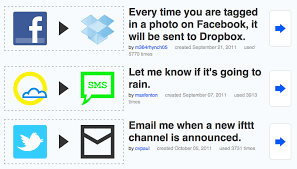

My favorite of all the recipes that I've set using the IFTTT app is -
>> IF- I download a .docx or pdf file using chrome, THEN- upload it to my google drive. <<
This recipe has proved to be very useful to me as I have 3 android devices with the google drive app, so, whenever I download any circular or exam schedule on my mobile, the IFTTT app comes into action and in the background uploads the file to my Drive account and BOOM! after some time I can pick up any of my 3 devices and have look at the pdf or Word document through the Google Drive app.
For further understanding or for signing up you can either download the IFTTT app through App store or Play store or visit the IFTTT website.
In simple language, you need to tell it what to do (like saving it to Dropbox/ Google drive or mailing to someone) when a specific task is done by you (like taking a screenshot/ picture or liking a pic on Instagram). The set of commands given by you in this way is called a recipe. And all the tasks to be performed are done in the background by the app. Making a recipe is similar to typing an 'If - Then- else' html code.
My favorite of all the recipes that I've set using the IFTTT app is -
>> IF- I download a .docx or pdf file using chrome, THEN- upload it to my google drive. <<
This recipe has proved to be very useful to me as I have 3 android devices with the google drive app, so, whenever I download any circular or exam schedule on my mobile, the IFTTT app comes into action and in the background uploads the file to my Drive account and BOOM! after some time I can pick up any of my 3 devices and have look at the pdf or Word document through the Google Drive app.
For further understanding or for signing up you can either download the IFTTT app through App store or Play store or visit the IFTTT website.

This comment has been removed by the author.
ReplyDeleteGuys plzz do comment if u find any flaw .
ReplyDeleteAnd also take part in the feedback poll which is placed on the top right corner of the page.
Guys plzz do comment if u find any flaw .
ReplyDeleteAnd also take part in the feedback poll which is placed on the top right corner of the page.